> ## Documentation Index
> Fetch the complete documentation index at: https://docs.guidewhale.com/llms.txt
> Use this file to discover all available pages before exploring further.
# Heap
> Send GuideWhale events to Heap Analytics for shared insights into user behavior and content engagement.
This integration allows you to send one-way events from GuideWhale content interactions (such as guide views, completions, and checklist usage) to Heap Analytics for advanced tracking and reporting.
All user events pushed to 3rd party platforms are prefixed with `gw_` to easily differentiate GuideWhale from other event sources.
## Use Cases
* Gain a thorough understanding of your clients’ journeys within your web app so you can increase conversion, satisfaction, and retention.
* Track how users are interacting with your in-app guides, checklists, and banners and compare that to how they are interacting with your website.
* Identify which features are being used the most and adjust your product roadmap accordingly.
* Analyze how users are completing specific tasks and identify pain points in your user experience.
## Requirements
* Installed GuideWhale Javascript SDK
* Installed Heap Analytics Javascript SDK
* Enabled integration in GuideWhale dashboard settings
## How It Works
* GuideWhale SDK will fetch the integration settings from our dashboard when a user is identified.
* When a new GuideWhale event is tracked, we first check if event pushing is enabled and if the event belongs to an enabled group of events.
* After that we try pushing the event to Heap using your installed Heap SDK if it is available.
* Please note that this will likely not work for users who have installed an ad blocker as it will block all events from going out to Heap Analytics.
## Configuration
1. Navigate to Settings > Integrations .
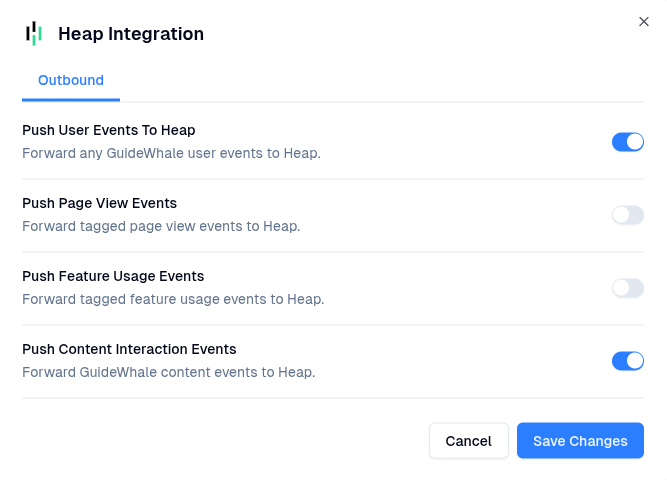
2. Here you will be able to enable the integration and toggle which event types you want GuideWhale to send to Heap Analytics.
3. Once enabled, users will start pushing GuideWhale events to Heap Analytics.